
Claude Design moves into Artifacts, but projects stay behind
Anthropic said on October 9 that the standalone Claude Design site at claude.ai/design will close on December 14, 2026. New designs, design systems and slide decks made in Claude are now created as artifacts. If your team built design systems in the standalone version, you can move them into Claude now. Projects can’t move yet, and anything left behind is deleted after the site closes.
The migration guide in the Claude help center says migrating leaves the original design system in the standalone version, unchanged, until the site closes. That matters because the design system holds most of a team’s setup. When Claude Design launched, Claude built a team’s design system by reading its codebase and design files, and every later project used those colors, typography and components automatically.
What a migrated design system looks like
Migrated systems appear in the design system menu when you make designs and slide decks in Claude. To see the full list, choose “View design systems” from the Claude Design menu on the Artifacts page. The list opens in Settings, where owners can pick the organization’s default with “Set as default.” Files arrive as they were. You can’t yet edit a migrated system on its own page, and its editors see a note at the top: “Migrated from the standalone version. Ask Claude to make changes.”
To re-run the migration for new, changed or fixed systems, use “Migrate again” in the same menu. “View details,” just below it, reopens the last results. To get a fresh copy of a system, delete the migrated version in Claude and migrate again. Duplicate it first if you want to keep edits you made in Claude.
When the check fails
A system that fails is listed under Couldn’t be migrated with its name, its owner and a short reason, such as “it’s too large.” The banner on the Artifacts page shows a count, for example “6 of your 11 design systems couldn’t be migrated,” and clicking it brings the list back. Anyone who can edit the system can fix its files: shrink oversized files, rename ones whose names an artifact can’t use, convert or remove file types an artifact can’t hold, save unreadable files again and re-upload missing ones. When the whole system is too big, the card says “It’s too large. Make it smaller.” If you can’t edit a system, you can’t run the check, so you need the owner named in its row.
Three reasons need your organization’s owner: “design systems are turned off for your team,” “your team can’t publish artifacts” and “its owner’s role doesn’t include design systems.” The first two stop the whole migration, and any systems it hadn’t reached yet are listed under Not started. When the check says “The problem is in the migration, not your files. There’s nothing for you to fix,” the only step is to try again later.
Settings for Team and Enterprise owners
Everything depends on the Artifacts setting, which is on by default. If artifacts are off, nobody in the organization can create designs in Claude or migrate anything, and nobody sees the “Claude Design lives here now” banner. Two settings under Templates, Design systems and Design and Slides, are on by default for Team plans but off for Enterprise plans, so on Enterprise an admin has to act before anyone can migrate. On Enterprise plans with custom roles, each role also needs the matching permissions, which the role editor lists under Artifacts. That way owners can turn on artifacts only for the people who use Claude Design.
While Design systems is off, everyone except owners sees the “Migrate team design systems” button grayed out, with the note “Ask your admin to turn on Design systems.” If the organization’s default design system migrates, it becomes the default in Claude too, unless someone has already set one there. Systems and projects whose owner has left the organization pass to its Primary Owner.
Projects stay behind
Projects stay in the standalone version and keep working until the site closes. The Artifacts page in Claude lists up to 60 of them, but they still open in the standalone version. Anthropic says more details about moving projects to Claude are “coming soon.” After the closing, whatever wasn’t carried over is deleted under Anthropic’s data retention practices, and public links to standalone projects stop working.
Organizations with zero data retention (ZDR) can’t turn on artifacts, so they can’t migrate at all. Their only option is to download projects before the site closes, one at a time: each comes as a .zip with every file in the project, free, and it doesn’t count toward usage limits.
Up next
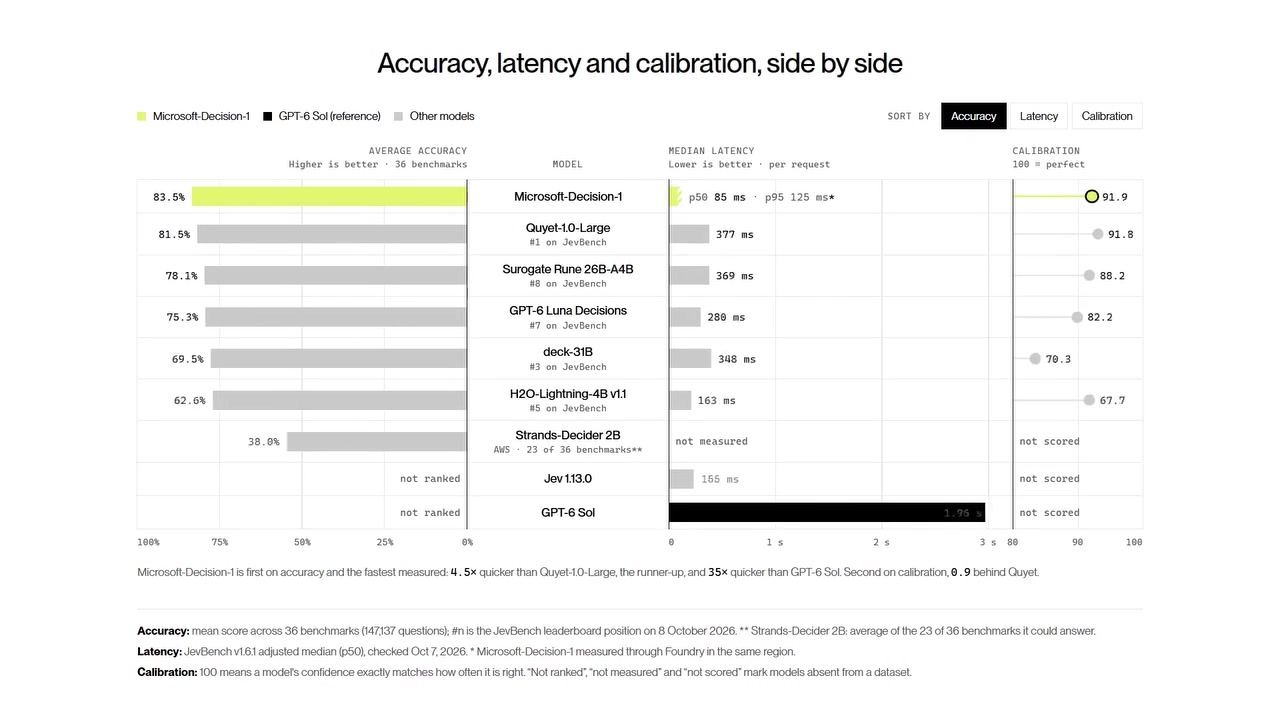
Microsoft-Decision-1 bills input only, at $0.042 per million, Video
Free output tokens shipped with Microsoft-Decision-1, a model that only scores the options you give it and never writes text. Input costs $0.042 per million tokens, and it’s live in Microsoft Foundry.
Related stories
- Claude’s slash commands reshape one answer three ways
- Anthropic folds Cowork into Claude chat and adds Slides
- Claude Design can draw with your real components
- Claude gets write access to Microsoft 365 on Dec 9
- Claude for Manufacturing plugin ships with 17 skills
- Claude Meetings joins Google Meet calls as a participant
Comments
No comments yet. Be the first.
Join the conversation
Sign in to leave a comment. It appears after moderation.