
Drawbridge: visual editing for Claude Code in the browser

Drawbridge is a Chrome extension that turns clicks on a live application interface into tasks for AI assistants. You leave comments directly on the page, similar to Figma, and the tool captures the element context, selector, bounding box, and a screenshot into a single task.
Tasks sync to the project as human-readable markdown (.moat/moat-tasks.md) and structured JSON for the AI. From there, you run the /bridge command in Claude Code, Cursor, Codex, or Windsurf. It offers three modes: step for confirming each task, batch for grouping related edits, and yolo for autonomous processing of the entire queue.
Drawbridge automatically generates the .claude/commands/bridge.md slash command and the workflow rules for the agents.
Up next
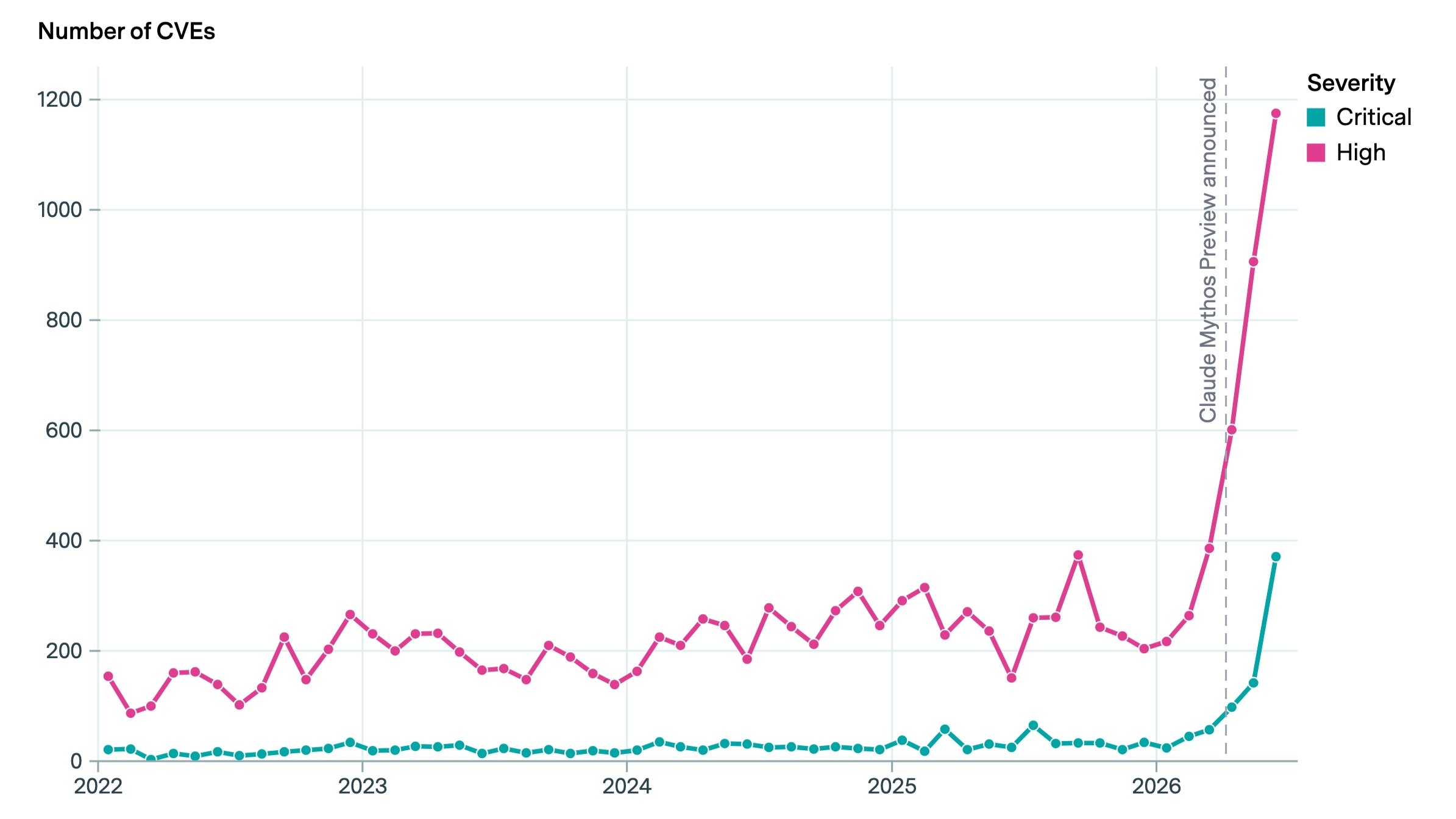
Critical vulnerability disclosures surge following Claude Mythos Preview
CVE disclosures surged 3.5x in June following the Claude Mythos Preview release. 21 organizations published 1,500 high-severity vulnerabilities in a single month. Project Glasswing partners, including Microsoft, Google, Apple, and AWS, have now identified over 10,000 high and critical vulnerabilities using the model.
Related stories
- Makoto is a Claude Code plugin that blocks the agent’s false claims
- agentpeek keeps Claude Code sessions alive after you close the laptop
- FleetView: a browser-based dashboard for parallel Claude Code agents
- Capacitor persists Claude Code and Cursor sessions to a shared store
- LoopFlow automates Claude Code with looping workflows
- Xcode 27 lets you export Agent Skills to third-party IDEs
Comments
No comments yet. Be the first.
Join the conversation
Sign in to leave a comment. It appears after moderation.