
Google’s Stitch Loop keeps improving your live product
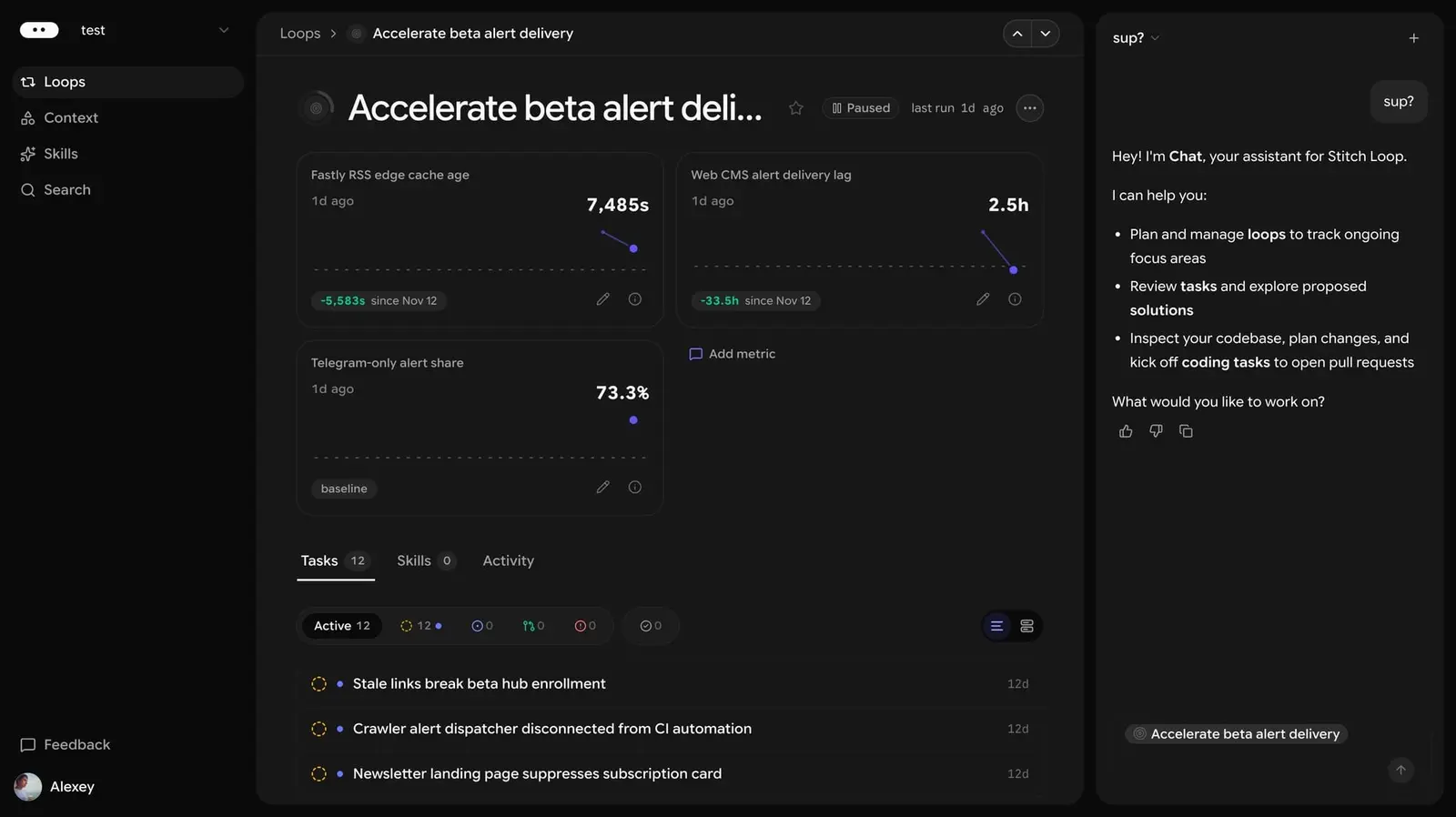
On November 18 Google announced Stitch Loop, a Google Labs experiment that works on a product after it ships. You don’t ask it for a specific code change. You give it a goal, like a safer app or a more active community, and it reads your production data, proposes metrics, suggests changes and keeps tracking the numbers after release. Google calls it a product agent “built for outcomes, not just PRs,” meaning more than the code changes developers submit for review. For now it is open only through a waitlist.
TestingCatalog has tried it and walked through how it works, from setup to the first suggested fix.
How it works
Everything starts with a Workspace built around a GitHub project. Inside it you create loops, which the app describes as mid- to long-term objectives that code can achieve. You can pick a ready-made one, such as Harden Application Security, or write your own from a prompt and an objective.
Loop then needs context. It can take files, links and repositories, and it connects to more than 100 services, including Jira, Linear, Sentry, Notion, Salesforce, Slack and Figma. Teams can also plug in their own tools through MCP, the standard way of connecting AI agents to outside services.
With that in hand, Loop studies the project and writes its own notes, called Skills, on the product and how it is measured. They sit in a separate tab, and you can edit them. It then proposes metrics and goals, which become loops right away and appear as running processes. When a loop finishes, it lists suggestions with a target value for the metric and how far along each one is.
A test run
TestingCatalog gave Loop the goal of growing contributions from its Telegram community. The agent split it into three numbers to track: members, registered contributors and active members, all on a dashboard. One task it created noted that the channel had no discussion threads and no bot, and it linked TestingCatalog’s site and channel as evidence for its numbers.
The proposed fix was a Telegram bot that collects submissions and passes them to the editors for sorting. It came labeled with its expected impact, scope and risk. From there, development is launched through Gemini, and Loop keeps tracking the KPIs once the change is live.
The TestingCatalog author reads this as a shift in the user’s role: each Workspace works like a full product team, so the person goes from leading a few agents to something like a senior manager over several teams. The author expects substantial progress in this area in 2027.
Where it came from
Internally Loop is called Jitro. That is the name TestingCatalog found in April for the next version of Jules, Google’s coding agent that works inside GitHub and drafts a plan for the user to approve before it changes any code. Its waitlist message at the time read: “Manually prompting your agents is so… 2025.”
Back then, TestingCatalog described Jitro as built around goals and a dedicated workspace, unlike GitHub Copilot, Cursor and OpenAI’s Codex, where developers still define each piece of work themselves. It also warned that agents pursuing goals on their own can make unpredictable changes, and that trust would be the main barrier to adoption. Byteiota raised a related concern: such agents leave unclear who is accountable for what they do. Stitch Loop is the first public version of that idea, and so far only people on the waitlist can try it.
Up next

Claude Code now draws charts on its own
Ask Claude Code for a chart and it now just draws one: version 2.1.330 adds easel, a built-in chart maker for Pro and Max on macOS and Linux. Auto charts can be turned off. Would you rather get charts in the terminal or paste data into a spreadsheet?
Related stories
- Antigravity’s /swarm runs subagents over a message board
- Google’s Antigravity reportedly opens Browser Use to all
- Cloud-run agents in Antigravity start reaching Ultra and Pro
- Claude Code stops resetting your config file
- Genie 4 opens to Google AI Ultra subscribers
- Mistral’s Vibe coding agent comes to the desktop
Comments
No comments yet. Be the first.
Join the conversation
Sign in to leave a comment. It appears after moderation.