
A strict sandbox mode surfaces in Claude Code desktop
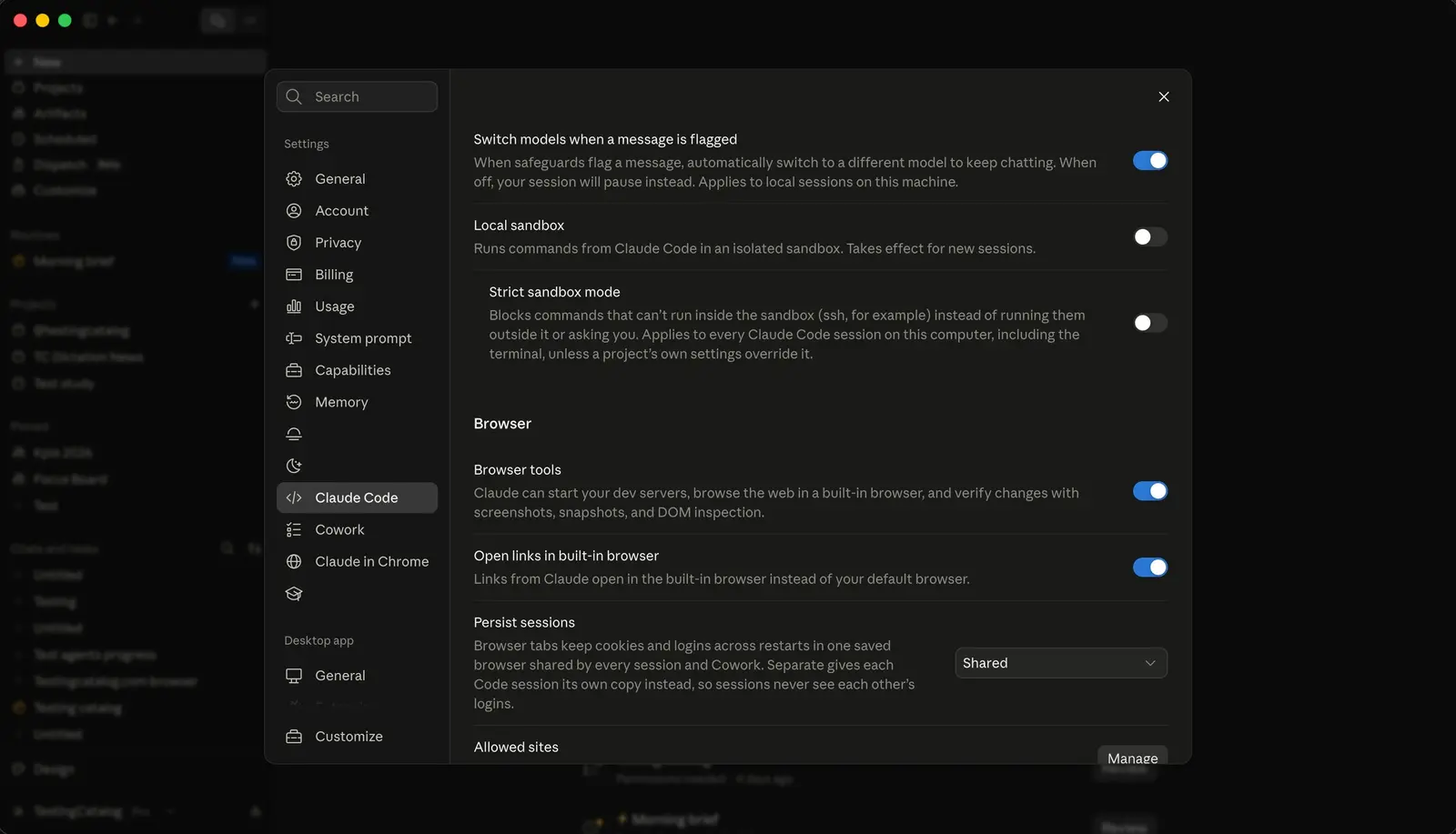
Anthropic is building a toggle into Claude Code desktop that runs Claude’s commands in an isolated local sandbox. It also has a strict variant that refuses to run anything outside the sandbox. The settings text posted on Threads on August 30 describes both options, and Anthropic has not given a rollout date.
The basic option reads: “Runs commands from Claude Code in an isolated sandbox. Takes effect for new sessions.” The strict one goes further:
Blocks commands that can’t run inside the sandbox (ssh, for example) instead of running them outside it or asking you. Applies to every Claude Code session on this computer, including the terminal, unless a project’s own settings override it.
None of this is a new engine. The toggle puts a switch in the app for the Bash sandbox that the CLI already has. Anthropic’s documentation describes that sandbox as a boundary the operating system enforces around the shell commands Claude runs. Because the OS applies the limits while a command runs, Claude Code can run sandboxed commands without asking you to approve each one. By default a sandboxed command can write to the working directory, a per-user temp directory and any added directories. It has no direct network route out: traffic goes through a proxy on your machine that checks each host against a list of allowed domains, and that list starts empty. On macOS the sandbox uses the built-in Seatbelt framework, and on Linux and WSL2 it uses bubblewrap and socat. On native Windows, Claude Code still runs commands unsandboxed. The whole thing is built on the open source @anthropic-ai/sandbox-runtime package.
Anthropic’s engineering post gives the reason for it. Claude Code’s default permission model is read-only and asks before it modifies files or runs commands, and the post warns that constant clicking leads to “approval fatigue.” Its figure: “In our internal usage, we’ve found that sandboxing safely reduces permission prompts by 84%.”
The strict mode targets the exits. In the current setup, a command can leave the sandbox in several ways. Commands you type at the ! shell-mode prompt run unsandboxed in most sessions, and so do commands that match excludedCommands. Claude can also ask to run a command unsandboxed, usually after it has failed inside the sandbox. The Overrides tab of the /sandbox panel controls that last fallback through allowUnsandboxedCommands. Going by the desktop wording, strict mode shuts exactly that path: ssh gets blocked, with no unsandboxed retry and no prompt. The docs already mention a “Strict sandbox mode” that lists the sessions where a command you type runs sandboxed.
The scope is the other change. Picking a mode in the /sandbox panel today writes to the project’s local settings in .claude/settings.local.json, which is not checked into git. Sandboxing for every project lives in ~/.claude/settings.json. The strict toggle in the desktop app works at the machine level and covers the terminal too, so switching it on in the app also changes how your CLI sessions behave. A project’s own settings can still override it.
There are limits either way. The sandbox covers shell commands only. Claude’s file tools, MCP servers and hooks run outside it. It is also off by default. Until the desktop toggle ships, you turn it on with /sandbox or by setting sandbox.enabled to true in a settings file. The panel’s Mode tab has two choices: auto-allow runs sandboxed commands without prompting, and regular permissions keeps the usual prompts even inside the sandbox. Organizations can enforce sandboxing through managed settings.
For anyone who wants the opposite trade, Claude Code 2.1.248 added a --restricted switch. It removes the tools that run commands or code, unless you name them in --tools. The sandbox keeps those tools and limits what they can reach.
One default works against strict mode’s goal. If the sandbox can’t start because dependencies are missing or the platform is unsupported, Claude Code shows a warning and runs commands without sandboxing. Setting sandbox.failIfUnavailable to true turns that warning into a hard failure. The docs describe that setting as meant for managed deployments.
Up next
Interactive Reports show up in Gemini Notebook
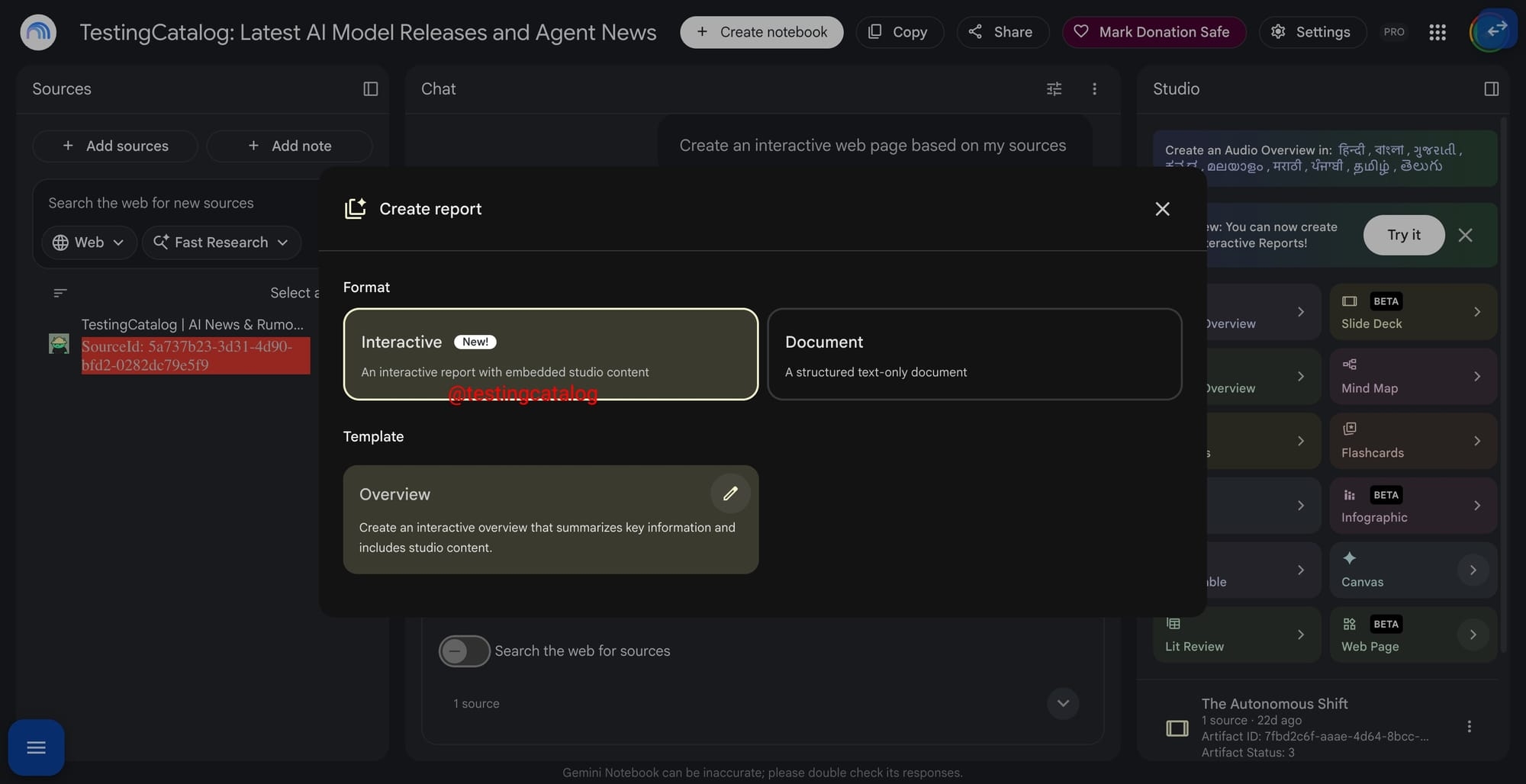
“New: you can now create interactive reports” reads a notice Testing Catalog found in the Gemini Notebook Studio panel. The button behind it opens the report creator, where an Interactive preset embeds Studio content.
Related stories
- Claude Code’s sandbox ships as an open-source npm package
- One git call let a repo escape the Claude Code sandbox
- Claude Code cloud sessions can run on your own hosts
- Claude Code may drop the folder picker at session start
- Backdoored Claude Code 2.1.313 hit up to 5,000 Cursor users
- Confessor reconstructs what Claude Code actually touched
Comments
No comments yet. Be the first.
Join the conversation
Sign in to leave a comment. It appears after moderation.