
Interactive Reports show up in Gemini Notebook
Promtime
 google
Google is preparing a new report format for Gemini Notebook, Interactive Reports, which embeds Studio content inside a generated report instead of returning static text. A notice announcing the format has appeared in the Studio panel, according to Testing Catalog.
At a glance
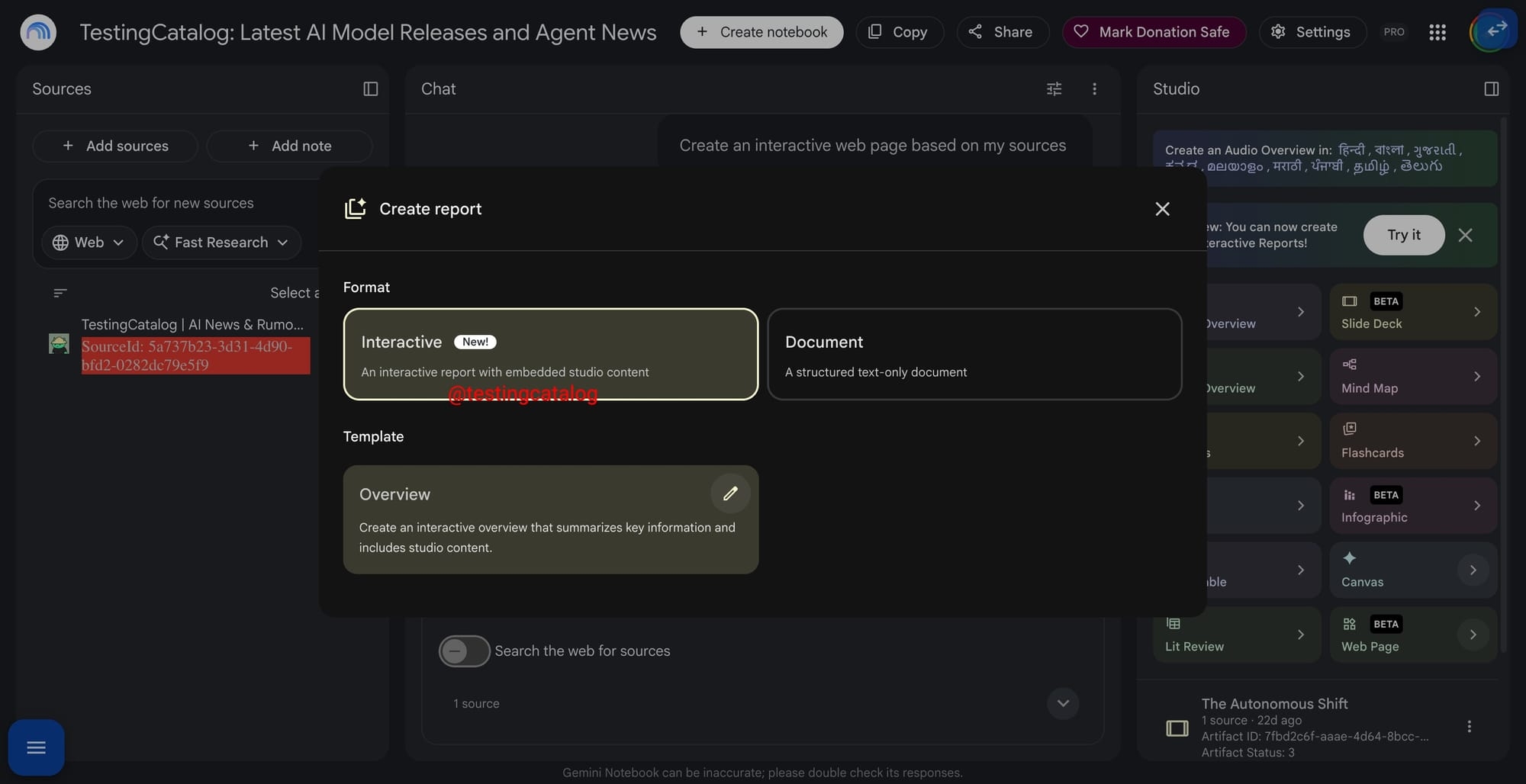
- The Studio panel now carries a notice reading "New: you can now create interactive reports", and its button opens the existing Create Report customization flow rather than a separate builder.
- Inside the creator, an option labelled Interactive is marked as New and described as an interactive report with embedded Studio content, while a second preset, Overview, produces an interactive summary of key information.
- In July Google expanded Studio beyond traditional summaries with generated documents, charts, spreadsheets and presentations, and Interactive Reports would combine that generated material with research output inside a single report.
Gemini Notebook started as a way to summarize a set of sources, and Interactive Reports reads as the step that ties the Studio outputs into one deliverable instead of a scatter of separate files. The practical shift is where research output lives: a single report that carries charts, spreadsheets and other generated material likely becomes the unit of work, which matters more for people assembling briefs than for casual summarizing.
The notice points back into the existing Create Report flow
The notice sits in the Studio panel inside Gemini Notebook and reads "New: you can now create interactive reports". Its button does not open a separate surface: it leads into the Create Report customization flow that Gemini Notebook already offers, with the interactive format available as a choice inside it.
Testing Catalog reads that wording as a sign Google is already preparing the feature for users, potentially within the coming weeks. Release messaging of this kind normally accompanies a feature close to a public rollout rather than an early internal experiment, since it is written for the people who will use it.
The Interactive preset is described as a report with embedded Studio content
Inside the report creator, the Interactive option is tagged as New and described as "An interactive report with embedded Studio content", placing it alongside the presets already available there. A second preset, Overview, produces an interactive summary of key information and pulls Studio content directly into the result rather than describing it in prose.
The creator lets a language be selected for the output and takes detailed written instructions describing the report a user wants. Google's own example asks for a formal competitive review of the 2026 functional beverage market, covering competitors, distribution and pricing in support of a launch strategy.
Studio gained generated documents, charts, spreadsheets and presentations in July
The groundwork for that was laid in July, when Google expanded Studio beyond traditional summaries with support for generated documents, charts, spreadsheets, presentations and other editable outputs, while positioning Gemini Notebook as a research environment capable of handling more complex projects.
Earlier builds of Gemini Notebook also carried placeholders for Canvas and Web Page outputs, which resemble the artifact-style experiences available elsewhere in Gemini and sit close in concept to the embedded Studio content that the Interactive preset already describes in the report creator.
Interactive Reports would extend that line by holding generated research and other Studio outputs inside a single report, rather than leaving each output as a separate file produced from the same set of sources uploaded to Gemini Notebook by the user.
What the release notice leaves open
Google has not announced a release date for Interactive Reports, and the panel notice carries no schedule of its own. It also leaves unstated which Studio outputs the format can embed, and whether the Canvas and Web Page placeholders seen in earlier builds end up inside reports or remain separate. The customization flow the notice points to already exists in Gemini Notebook, so the format would surface there first.
Comments
No comments yet. Be the first.
Join the conversation
Sign in with Google to leave a comment. Your name and avatar come from your Google profile, and the comment appears after moderation.
We only use your name and avatar from Google. We never store your email address.