
anthropic
/resume carries CLI sessions into the desktop app
Promtime
 anthropic
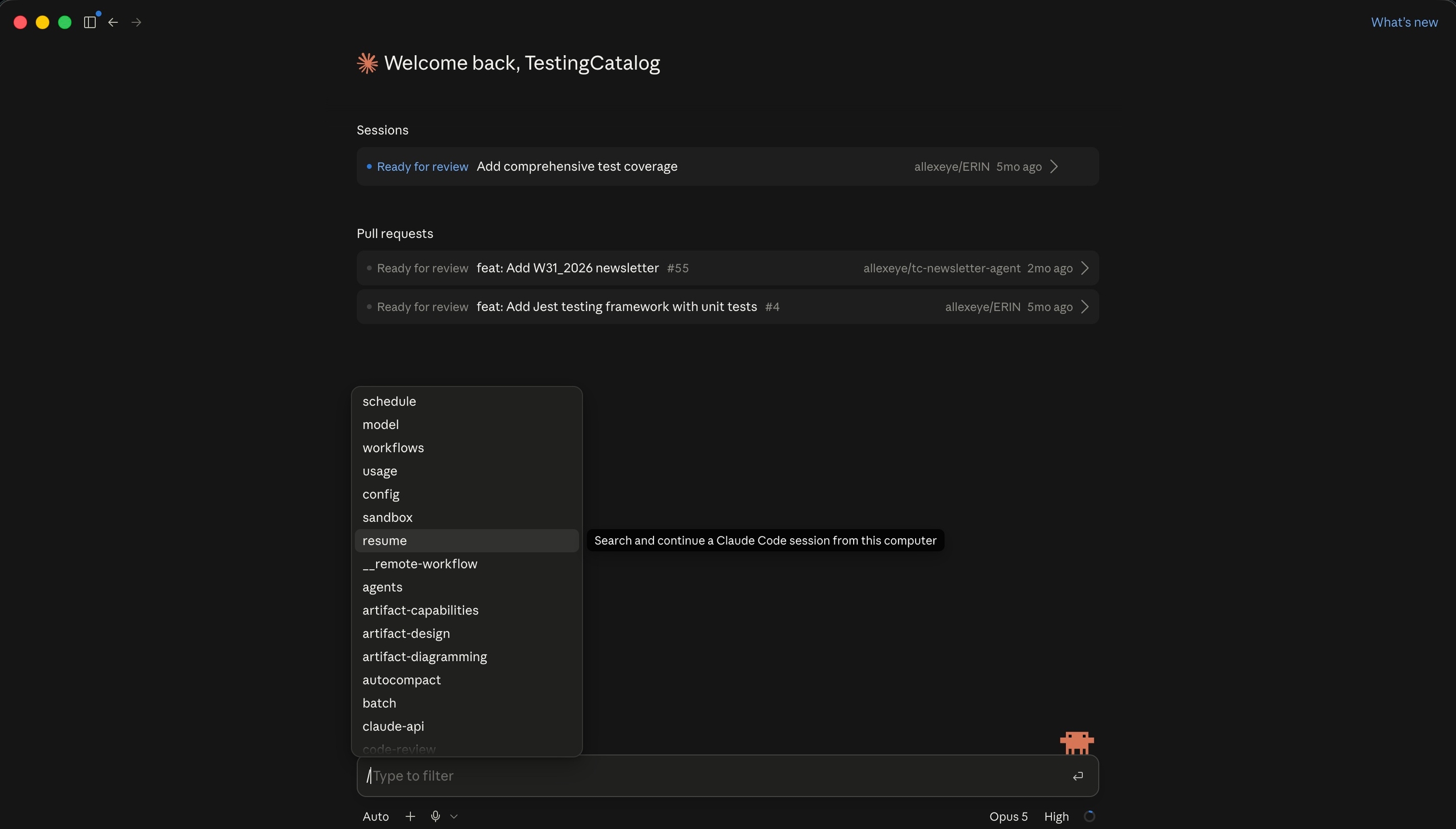
Claude Code's desktop application has gained a /resume command that reopens conversations started in the Claude CLI. The change was described in a post on Threads, which frames it as one more step toward Hub, the unreleased mode Testing Catalog spotted in internal testing earlier this year.
At a glance
- A session opened in a terminal can be picked up inside the desktop application, so the state of a Claude Code conversation is no longer tied to the surface where it began.
- Anthropic's documentation places /resume inside a running session for switching conversations, while claude --resume and claude --continue reach earlier work at the moment the command-line client is launched.
- According to a Threads post, sessions can be named with /rename and reopened with /resume <name>, while the /resume screen groups forked sessions and adds keyboard shortcuts for preview and rename.
Claude Code has effectively been two products with one brain: a terminal client for people working in a shell and a desktop app for everything else, each holding its own history. Making a session portable between them reads as an attempt to treat the surface as a detail rather than a commitment made at the start of a task. That is also what gives the Hub framing weight, since a hub implies one place where work started anywhere can be picked up.
The desktop app reopens conversations created in the Claude CLI
The command runs inside the Claude Code desktop application and reopens conversations that were created in the Claude CLI, so work started in a terminal continues in the app window rather than being restarted from scratch or reconstructed message by message.
Claude Code is Anthropic's agentic coding tool, and it runs both as a command-line client in a terminal and as a desktop application. The two have separate interfaces, and the /resume command is the point where a session created in one becomes available in the other.
The desktop command carries the same name as the slash command documented for the terminal, so /resume now exists on both surfaces. What differs is the reach: in the desktop app it opens a conversation created by a different client.
Claude Code already documents /resume for returning to a previous session
The command predates the desktop version of Claude Code. Anthropic's documentation describes /resume in the CLI as the way to move to a different conversation without leaving the session in progress, and pairs it with the launch flags claude --resume and claude --continue.
A Claude Code session accumulates context while it runs, including the instructions given and the work already done in the project. Reopening a session returns that accumulated state, rather than starting a new conversation with an empty history in the terminal or in the app.
A Threads post describes named sessions in Claude Code: /rename assigns a name to a session, and /resume followed by that name reopens it. The same post reports a reworked /resume screen on which forked sessions are grouped rather than listed separately, with keyboard shortcuts for preview (P) and rename (R).
Testing Catalog reads the command as one more step toward Hub
Testing Catalog describes the desktop /resume command as one more step toward Hub, the unreleased mode it reported spotting in internal testing earlier this year. Hub has not shipped, and Claude Code today is still two clients, a terminal one and a desktop one, that now share session history through the same command name.
Claude Code started life as a command-line tool and gained a desktop application later in its run, and the two have been developed as separate clients over the same agent. Anthropic has continued to extend both, and the session commands are one of the areas where their feature sets overlap.
Hub remains unannounced
No release date has been given for Hub, and the desktop /resume command is so far described only as a way back into conversations that began in the CLI. Whether named sessions and the grouped /resume screen reported on Threads behave the same way in the desktop application is not spelled out either.
Comments
No comments yet. Be the first.
Join the conversation
Sign in with Google to leave a comment. Your name and avatar come from your Google profile, and the comment appears after moderation.
We only use your name and avatar from Google. We never store your email address.