
claude-code
CLI sessions carry over to Claude Code desktop with /resume
Claude News
 claude-code
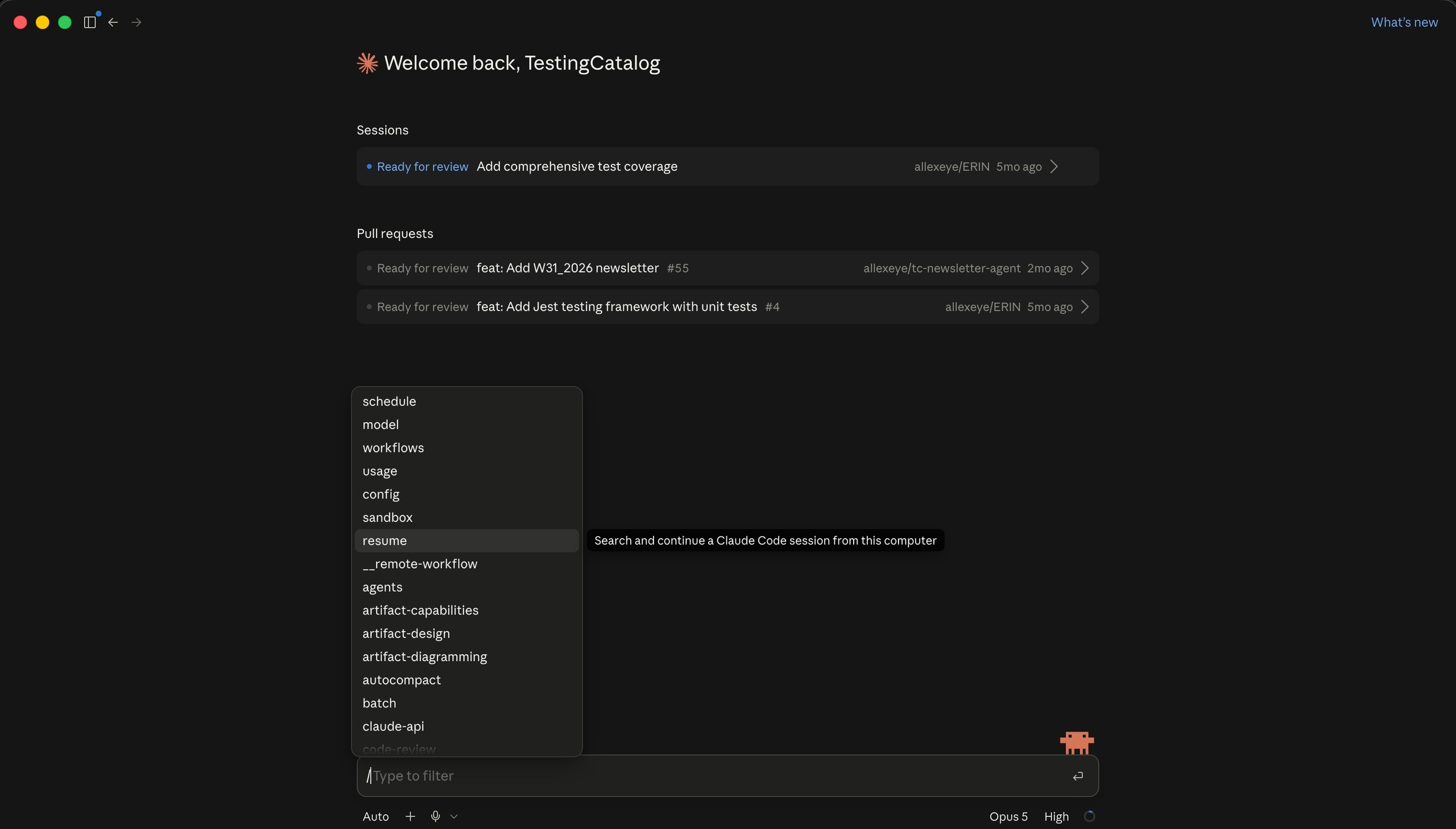
Claude Code desktop has gained a /resume command that reopens sessions started in the Claude CLI. The addition was flagged in a post on Threads, which describes it as one more step towards a hub, a single place where work opened in one client is reachable from the other.
At a glance
- The command connects two surfaces of the same product: a run opened in the terminal can be picked up in the desktop app rather than started again from an empty context.
- Per Anthropic's documentation, sessions can be named with /rename and reopened by that name, while the CLI keeps its existing claude --resume and claude --continue entry points for earlier runs.
- The transfer works in both directions, according to the post on Threads: running /desktop inside the CLI hands the current session to the desktop app, where it continues in a graphical interface.
Session continuity is the practical constraint on using Claude Code across more than one surface: a terminal run that cannot be reopened elsewhere pins the work to the window where it started. The /resume and /desktop pair reads as an attempt to make the session, rather than the client, the unit that persists. That is also the shape a hub would require, which is how the post on Threads frames it.
Issue #50067 for desktop /resume was closed on August 17
The GitHub feature request for desktop /resume, issue #50067, was closed on August 17. The command answers what that request asked for: the ability to open, inside the desktop client, a session that was created in the terminal and left unfinished there.
Resuming restores the conversation and the working context of the earlier session, so a task continues from the point where it stopped instead of being described again. In the desktop app that turns terminal history into a list of entries that can be opened in a graphical client. The desktop client and the CLI address the same Claude Code sessions, and resuming is how one picks up what the other started.
The CLI already reopened earlier sessions with claude --resume and claude --continue
On the CLI side, resuming is older than the desktop command. Per Anthropic's documentation, claude --resume and claude --continue reopen earlier sessions, while /resume works from inside a running one. The desktop app now answers to the same /resume instruction.
Per the same documentation, a session can be given a name with the /rename command and then reopened with /resume followed by that name. Named sessions sit alongside the default flow, in which a run is picked from the resume screen rather than addressed by name.
The resume screen itself has changed: keyboard shortcuts open a preview with P and start a rename with R, according to the documentation. Preview shows what a session contains before it is opened, and renaming works from the list without entering the session first.
Session features have landed in pieces since mid-August
Movement runs in the other direction as well, one of several session changes that have landed in pieces since mid-August. According to the post on Threads, running /desktop inside a CLI session brings that session into the desktop app, so work started at the command line continues in a graphical client without being restarted. The command is issued from within the running session itself.
Per Anthropic's documentation, forked sessions are grouped together on the resume screen. A fork is a session branched from an earlier point in another run, which leaves several related histories from one start, and grouping keeps those branches under a single entry in the list of past sessions.
The hub remains a characterisation
The hub framing comes from the post on Threads and not from a published roadmap, so the shape of any merged client remains open. Anthropic's documentation covers named sessions and the P and R shortcuts on the resume screen without stating whether the desktop list carries the same controls, and no timeline has been given for further session features.
Comments
No comments yet. Be the first.
Join the conversation
Sign in with Google to leave a comment. Your name and avatar come from your Google profile, and the comment appears after moderation.
We only use your name and avatar from Google. We never store your email address.