
Meta’s Muse agent quietly lands in the Chrome Web Store
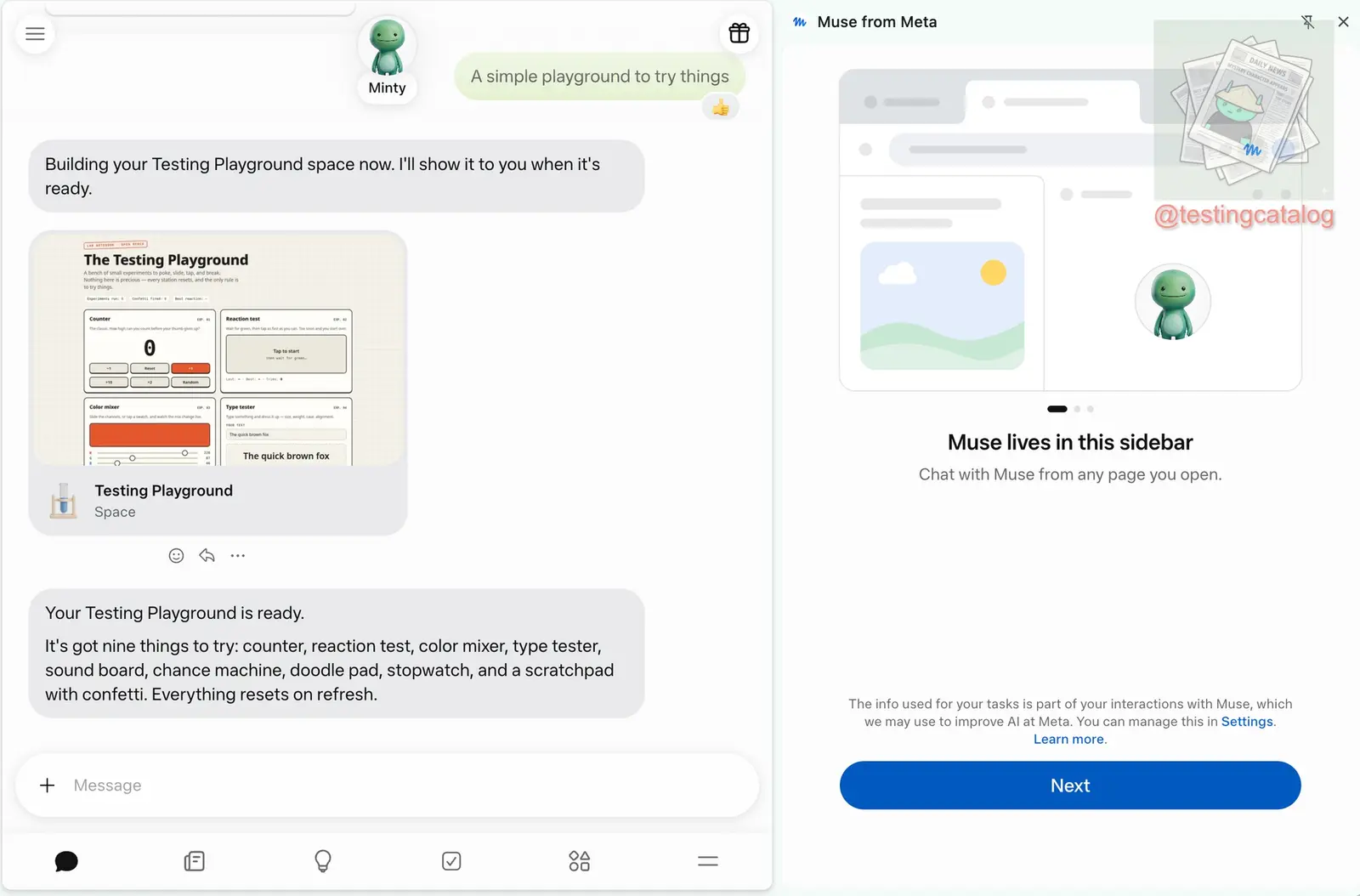
Meta’s Muse agent can now work inside Chrome. An extension called Muse from Meta is live on the Chrome Web Store, and Meta’s listing, last updated on November 12, says it handles nine categories of user data, including health, financial and authentication information, personal communications and web history. If you install it, Muse works through the accounts you’re already signed into in Chrome. The extension’s own setup screens, which we read in the package, tell you to log out of any account you don’t want it to use.
Testing Catalog reported that Meta has not announced the release. Muse already had mobile apps, a desktop app and a web version. The extension opens it in Chrome’s side panel, where you log in, pick up existing conversations and ask the agent to navigate sites, control pages, help with shopping or book cinema tickets without leaving the page. The panel also has sub-conversations and settings, but some sections, including Ideas, still redirect to the Muse website. How well the browser automation works across different sites has yet to be tested.
When we checked the listing on November 13, it showed 126 users and no ratings.
What it asks to connect
The listing invites you to link email, calendar, Instagram, Facebook, health and fitness data, and finances. It pitches Muse for whole jobs, such as selling a car, negotiating a bill down or booking a trip. Small businesses can connect Instagram Business accounts, Facebook Pages and Meta ad accounts. The listing names three controls: you approve actions before they happen, Muse keeps a full activity log, and you can revoke any connector at any time. Meta says the data is not sold to third parties outside approved use cases and is not used to determine creditworthiness. The setup screens also cover training. The information used for your tasks is part of your interactions with Muse, “which we may use to improve AI at Meta,” and you can manage this in settings.
Muse is sold as “AI-powered shopping that can actually buy on your behalf, with your OK.” With subscriptions, it checks with you “before it cancels or spends.” The same listing says Muse “may be inaccurate or take unexpected actions, so check in to keep it on track and intervene as needed.”
In the extension’s WebAssembly core, the compiled engine behind its browser actions, we found 344 entries naming merchant checkout pages, each next to a URL pattern. IKEA, Delta and Hulu are among them. The core also names page signals for one-time-code, password and card-number fields and for Shop Pay checkout. A bundled helper for typing passwords carries a comment saying it never returns any part of the value. The strings don’t show what the agent does when one of these signals fires. Our inference is that it feeds the approval step.
Our analysis
What we checked
On November 13 we downloaded version 2.0.65 from the Chrome Web Store, matched its hash to the one the store serves, and read its manifest, code and interface strings.
The store page describes a side panel. The package shows an agent that drives your tabs through Chrome’s debugging interface, which isn’t limited to the six Meta addresses the extension declares, and it works in whatever accounts you’re logged into. The only sites the code itself blocks are Meta’s own.
- The
debuggerpermission is its only way to control pages. The extension has no content scripts and no access to all sites. Method names in the package cover mouse and keyboard input, text insertion, screenshots, the accessibility tree, file uploads and request interception. We did not measure which of them fire in a given task. - The agent doesn’t run locally. The extension pairs your Chrome with a virtual machine on Meta’s side, and it accepts a task only if the task asks for shared storage and enforced navigation consent. That shared storage means your logged-in profile is our inference. We did not test whether a consent prompt appears for every action.
- The hard-coded block list covers Muse’s own hosts,
internalfb.com, WhatsApp domains and port 9222. The word “bank” appears in none of the four code files we scanned. A further list is downloaded from Meta’s server, and we could not read it. - Muse is now available in four countries. In October the list read US, Canada and Japan, and Meta launched Muse in Singapore on October 28. Shop Pay checkout works only where Muse is supported. We did not check whether it works in Singapore.
Taking a tab back
Muse’s tabs open in their own tab group, and while it works, Chrome shows its standard bar warning that the browser is being debugged. If you cancel that bar, the extension asks whether to keep Muse working, with “Keep working” as the default button. The setup screens say you can watch, pause, take over or stop Muse’s activity at any time. To take over a single tab, drag it out of Muse’s group.
Up next

Anthropic and OpenAI sued over neural network patents
“Cavalier” is how a University of Tennessee foundation’s patent suit describes Anthropic’s approach to other people’s IP. Reuters says inventors are now suing OpenAI as well.
Related stories
- Meta’s Muse agent leaves North America for Japan
- A terminal, a file system and a browser for Muse
- Muse checks out with Shop Pay where Meta allows it
- Leaked Hatch materials point to a Meta agent superapp
- Grok Bot exits beta and joins Slack, Teams and video calls
- Meta’s Muse models now hit 90% on its own memory eval
Comments
No comments yet. Be the first.
Join the conversation
Sign in to leave a comment. It appears after moderation.