
Claude Code 2.1.251 streams subagent work live
Claude Code 2.1.251 adds PreModelSwitch and PostModelSwitch hook events, which can block, confirm or annotate a model switch as it happens. According to the release notes published on GitHub, SessionStart resume hooks now also receive session staleness and the estimated cost of re-caching the conversation.
At a glance
- A foreground subagent's tool calls and results now stream live to Remote Control clients, while background subagents, which remain the default, continue to report status only.
- /usage gains a Spend limit bar for developers behind a Claude apps gateway, and /cost gains a per-session prompt-cache line covering hit ratio, misses, tokens re-cached and warm or cold state.
- Read, Write and Edit could follow a symlink swapped inside the working directory after the permission check had passed, reading or writing outside the approved location; that path is now closed.
The release leans on control surfaces rather than capability. Hooks that can veto a model switch, settings changes that require explicit approval before they take effect, and a spend bar inside /usage all point at teams running Claude Code under managed settings or a gateway, where the question is less what the agent can do than what it is allowed to do without asking. The security fixes read as a sweep through paths that trusted a check made earlier.
PreModelSwitch and PostModelSwitch can block a model change mid-session
Model selection changes across several surfaces. CLAUDE_CODE_SUBAGENT_MODEL now sets the default subagent model instead of overriding everything: an agent definition's model field and an explicit per-spawn model take precedence. /effort stores a default effort level per model, so each model keeps its own setting after a switch.
Seat-based Enterprise subscriptions now default to Opus 5, matching other premium plans. Opus 5 requests failed with an unsupported-effort error when effort was set to xhigh or max and thinking was turned off; effort is now sent as high in those requests.
Conversations could get stuck on "text content blocks must be non-empty" errors after a turn in which the model produced only thinking; that is fixed. On a fresh install, the first launch now starts in auto mode for accounts whose startup default is auto mode, and managed-settings disableAutoMode arriving mid-session moves a running auto-mode session back to default mode.
Plugin marketplace paths and Workflow scriptPaths are now checked before use
Plugin commands declared in a marketplace entry could point outside the plugin directory; such paths now raise a path-traversal error. The Workflow tool read a scriptPath outside what the session may read, and quoted it in errors, before the permission check ran. Grep and Glob did not apply Read(...) deny rules to files reached through a symlinked search path.
Project settings can no longer enable detailed beta tracing or raw API body logging, or set CLAUDE_CONFIG_DIR, CLAUDE_CODE_TMPDIR or TMPDIR. Server-managed settings that terminate sandbox TLS, route sandbox traffic through a proxy, inject credentials or weaken sandbox isolation now require approval, as does ANTHROPIC_CUSTOM_HEADERS when it sets a credential, org, routing or API-behaviour header.
Dropping six languages' syntax highlighting cuts 2.5 MB from the binary
Syntax highlighting for 1c, gml, isbl, mathematica, maxima and sqf is gone, which the release notes credit with 2.5 MB of binary size; the native binary is described as about 5 MB smaller overall. Interactive sessions cut redundant UI re-renders to lower CPU usage during turns, and per-second progress ticks from parallel subagents replace their predecessor instead of accumulating in the transcript.
claude --help now documents attach, logs, stop, respawn and rm, and the --resume message for a running background session names the exact claude attach <id> command. SDK and cloud sessions that lost an SDK MCP server's handshake acknowledgment hung indefinitely; the wait now times out after 70 seconds and marks only that server failed.
The VSCode extension's Remote Control pill
In the VSCode extension, the Remote Control banner becomes a footer pill, shown while Remote Control is on or has failed, that opens the session on claude.ai/code; /remote-control turns it on or off. Where an organisation's policy disables Remote Control, the client now shows a single quiet notice rather than reporting a failure. The release notes do not say whether background subagents will stream their tool calls.
Up next
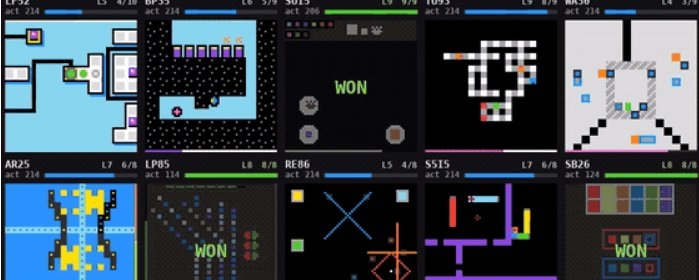
A harness pushes Claude Opus 5 past 30% on ARC-AGI-3
30% alone, 99.95% wrapped in an agent harness built with Strands: that's Claude Opus 5 on ARC-AGI-3, per the author's write-up, though NVIDIA reports 100% for the same model inside its own AVO harness.
Related stories
- --restricted strips code execution from Claude Code 2.1.248
- Claude Code 2.1.259 hands MCP servers to the whole org
- Claude Code Projects admits its whole Pro and Max waitlist
- In Claude Code, a "block" hook could let commands through
- Claude Code Projects threads can now run on your machine
- Claude Code's /code-review now has effort levels
Comments
No comments yet. Be the first.
Join the conversation
Sign in to leave a comment. It appears after moderation.