
Claude Code 2.1.311 can drop its last rm -rf guard

A new Claude Code release can remove the last prompt that --dangerously-skip-permissions still keeps for commands like rm -rf ~. To switch it off, you set CLAUDE_CODE_EVEN_MORE_DANGEROUSLY_SKIP_PERMISSIONS=1, Anthropic’s Daisy Hollman said in an October 28 post. Bypass mode keeps asking before deleting your home directory until that variable is set. Once it is, The Register reports, rm and rmdir run without approval, though managed settings may still impose their own limits.
The Register puts the change in v2.1.311. The flag itself is shorthand for --permission-mode bypassPermissions, in which Claude acts with your permissions and doesn’t stop for approval. The Claude Code docs reserve that mode for “Isolated containers and VMs only”. They also list a few actions that no mode approves automatically, and recognized rm and rmdir removals of critical paths are among them: no allow rule or PreToolUse hook returning “allow” gets past that check. The same page already says that “you can turn off the prompt for dangerous rm commands in bypassPermissions mode.”
Bypass mode is one of six permission modes, alongside default, acceptEdits, plan, auto and dontAsk. It first appeared in Claude Code v1.0.18 on June 9, 2025. The Register says auto mode became the default in August. Auto lets almost everything through but runs safety checks in the background, and bypass skips those checks too.
Anthropic’s own employees already don’t get bypass mode even when they ask for it. RuntimeWire inspected the tool’s public JavaScript on October 18 and found that staff sessions requesting bypass start in Accept edits instead.
The variable isn’t in the v2.1.311 changelog, and some readers took the post for a joke. Hollman answered them directly: “Not a joke! I hope this helps, and I hope the variable name is memorable.”
Up next
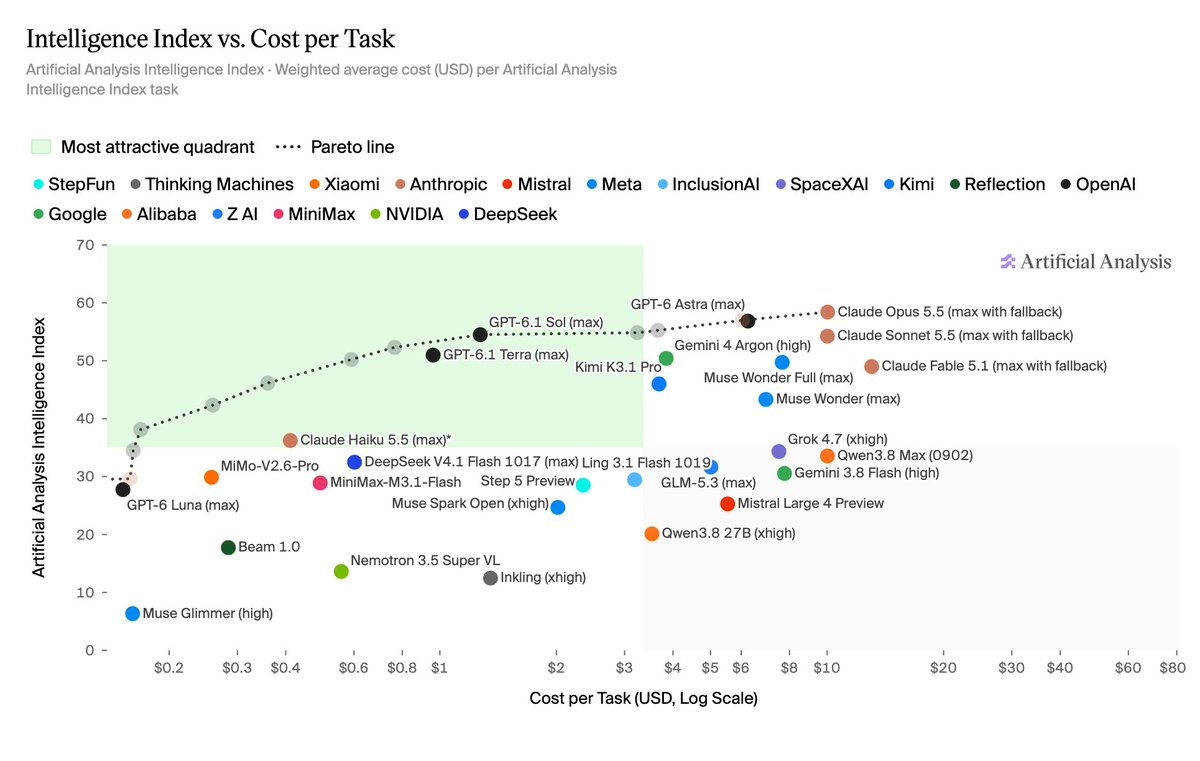
Intelligence Index v5: Opus 5.5 at 58, GPT-6 Astra at 57
Most of the new Artificial Analysis Intelligence Index v5 runs on private datasets, and on it Claude Opus 5.5 scores 58 to GPT-6 Astra’s 57. Do you pick models by benchmark scores or by your own tests?
Related stories
- RuntimeWire: Claude Code puts staff bypass in Accept edits
- Claude Code 2.1.309 closes sandbox and permission holes
- Claude Code 2.1.282 ignores telemetry set by project files
- Claude Code opens network hosts one command at a time
- Claude Code 2.1.223 patches a Bash permission bypass
- Worktree isolation was leaking git commands into the main copy
Comments
No comments yet. Be the first.
Join the conversation
Sign in to leave a comment. It appears after moderation.