
memsaga gives Claude Code’s memory files a git history
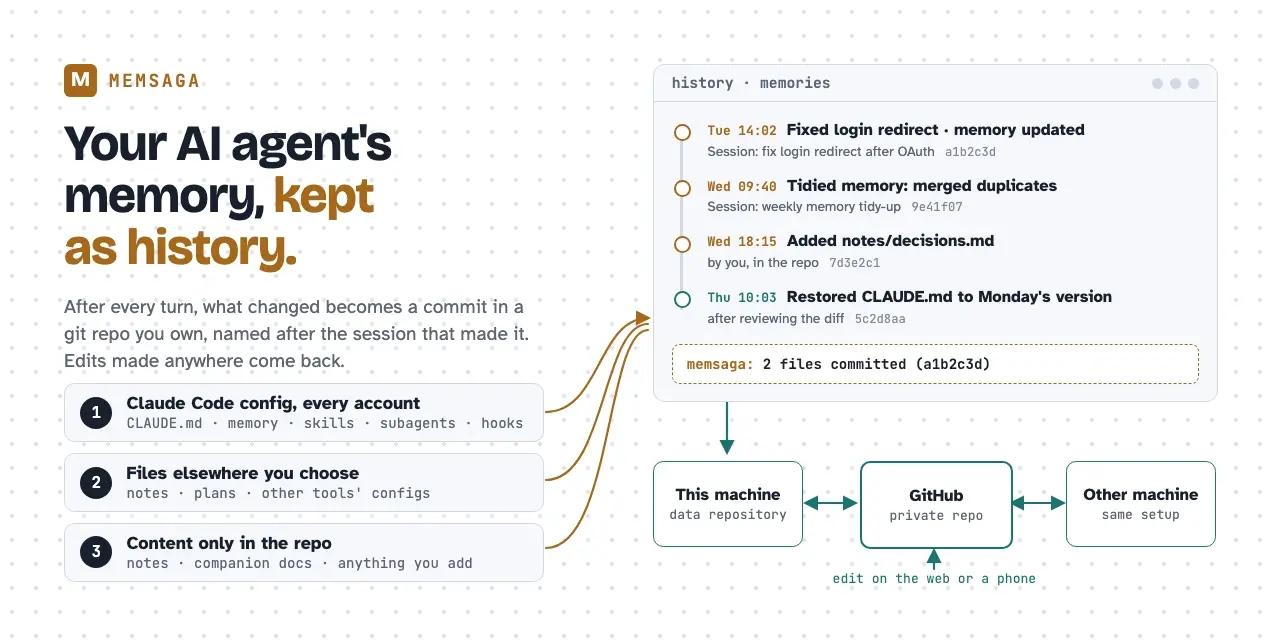
memsaga, an open-source tool shown on Show HN on November 10, commits Claude Code’s auto memory, your global CLAUDE.md and your skills to a git repository you own at the end of every turn. Its first run also replays edits from up to 30 days of session transcripts, the period Claude Code keeps them by default, as dated commits. Its author writes in the README on GitHub that one account on one computer gets most of that history from a hand-rolled git repo in ~/.claude plus a Stop hook. memsaga’s own additions are sync across machines and accounts and edits made on GitHub reaching the live file. It is early: in daily use by its author on macOS, with Linux tested in CI and in a container.
The gap it fills is plain. The Markdown files Claude Code writes about you and your projects have no history and live only on the machine that wrote them. A later session can rewrite a memory, two sessions that edit the same file on one day leave no trace of the earlier version, and a clean-up that merges ten memories into three can’t be undone. A CLAUDE.md inside a repository is versioned with that repository. ~/.claude/CLAUDE.md and the files under ~/.claude/projects/<project>/memory/ are not.
What a commit records
When Claude’s reply ends, a memsaga hook copies whatever changed into the data repository and commits it. The subject line carries the session title, and the body carries the session ID, account and working directory. So git blame on CLAUDE.md leads from a line to the conversation that wrote it, and claude --resume <session> reopens that conversation as long as Claude Code still keeps the transcript. The commits stay after the transcript is gone. A one-line notice in the terminal (memsaga: 2 files committed) flags memories Claude wrote on its own. A turn that changed nothing costs a check of modification times. A turn that did costs a copy and a commit, well under a second, in the background.
memsaga restore shows the diff and asks before writing an old version back. With --all --at <commit> it puts every mirrored file back as it was then, overwriting what differs and never deleting anything.
The DIY setup keeps its history inside ~/.claude itself, where a git checkout, a git clean or a merge conflict changes the files Claude is reading. memsaga keeps a mirror in a separate folder, by default memories in the folder where you keep code, such as ~/git/memories. A hand-rolled hook covers only what sits in ~/.claude. memsaga also takes single files elsewhere that you list in extra_files, such as a plan in your home directory, though whole folders outside the config directory aren’t supported yet. Claude Code is the only source today, and Codex is first on the roadmap.
Before you run init
Installation needs macOS or Linux, git and Claude Code. The Windows route is in the FAQ. The binary comes from an install script, from Homebrew (brew install grimmerk/tap/memsaga) or from cargo, under the MIT license. A few choices are hard to undo once memsaga init has run:
memsaga init --dry-runwrites nothing and shows where the repository would go, which Claude Code config folders it found and how much history can be replayed.- A project to keep out entirely, such as client work, goes into
exclude_projectsin~/.config/memsaga/config.tomlbefore init. Excluding it later stops new commits but leaves what is already in the history. - If you run Claude Code with
CLAUDE_CONFIG_DIR, run init in a shell where it is set. A second account set up without it, such as~/.claude-work, has to be listed as a root by hand. memsaga install --skillswrites a SKILL.md into folders namedmemsaga-history,companion-docsandcompanions, replacing any SKILL.md already there. Rename your own folder first if the name collides.
The README asks for a private repository, because memory holds whatever Claude learned while working with you, often details of your work. memsaga does not scan what it copies for secrets. The default scope leaves out ~/.claude.json, credentials and transcripts, and takes settings.json only on request. Plugins installed from a marketplace stay out too, since you can install them again.
Two machines, one memory
With an origin remote on GitHub, pushes happen at the end of a turn at most once every ten minutes, and right away when a session ends. At session start memsaga asks GitHub whether the repository moved, and Claude Code waits about half a second for the answer. At each prompt, and when Claude reads a file memsaga keeps, the same check runs in the background, at most once a minute for the whole machine. An edit made on GitHub, a phone or another machine is merged into the live file. Edits from both sides are kept, and when both changed the same lines the file is left alone and memsaga reports the conflict. Claude gets a short notice with the changed lines so it doesn’t answer from the copy it loaded earlier. A Write that would replace text that just arrived is refused, and Claude is told to read the file again.
A project shares its memory across machines when it sits at the same path relative to the home directory on both, even with different user names. The second machine is set up by cloning the data repository and running memsaga restore --all --at HEAD. Running memsaga init there would commit its empty state on top of your history. Machines that share a repository should be updated together. memsaga 0.1.3 and earlier synced the binary’s path itself, so a machine pulling another machine’s path ran hooks that pointed at nothing.
A clean-up you can roll back
Memory grows by small additions, and the MEMORY.md index drifts from the files it lists. Claude Code loads the first 200 lines (or 25 KB) of that index every session. Past that limit the index is cut silently, and Claude has no idea it was truncated, Mem0 says. Asking Claude to tidy it is risky when the live copy is the only one.
The README’s routine for that: start a session with a prompt to read every file under ~/.claude/projects/*/memory/, merge duplicates, drop what is no longer true and keep MEMORY.md in step with the files. Then review the pass with git log -p --grep 'Session: <id>' and roll back what didn’t help with memsaga restore --all --at <commit before the pass>. Because --all never deletes, a file the pass created stays until you remove it.
Related stories
- Claude Soul: a learning system for Claude Code
- Intent-lens spells out Claude Code calls before they run
- Codedict cuts Claude Code tokens 63%, but cost only 26%
- claude-files-pane shows Claude Code’s file reads live
- lcc cut one Claude Code session 49.5% without a summary
- catnap keeps Claude Code from compacting mid-task
Comments
No comments yet. Be the first.
Join the conversation
Sign in to leave a comment. It appears after moderation.