
Oh My Subagents keeps Claude Code teams running
Oh My Subagents, an open-source local runtime, takes parent-to-subagent delegation out of a Claude Code or Codex session and moves it into a controller with its own database. That lets a team of agents keep working after you close the terminal, after a provider session drops, or after the controller itself restarts. On September 1 the project’s README on GitHub described the goal as turning “ad-hoc subagents into durable, accountable AI teams”.
Both providers can already delegate. A Claude Code subagent is an isolated Claude instance with its own context window. It takes a task and returns only the result, according to Claude’s guide. Codex spawns specialized agents in parallel and collects their results in one response. In both cases, the record of who did what lives in the session. The OMS README describes what that costs: a parent “spawns children, polls them, reconstructs ownership from chat, and hopes that a closed terminal or interrupted provider session did not erase the only useful account of what happened.”
How a Wave works
OMS has its own vocabulary. A Workflow is a published tree of named roles, called Members. A Manager is any Member that delegates. A Wave is one batch of child Assignments sent out together. When a Manager delegates a Wave, the controller commits the child Assignments and the parent’s wait state together. Children return terminal Checkpoints independently. Once the whole Wave is back, the controller resumes the parent with every return. The parent never sits in a polling loop, and the README says this holds even after an interruption.
Delegation can go several levels deep. Every Manager follows the same rule with its direct children: delegate, wait, inspect the complete returns, integrate. Deeper teams, the README says, need “no hidden global polling loop”.
The runtime also decides what counts as finished. A provider reporting that a run completed does not count as success. Child completion counts as evidence for the parent, and only the Task lead’s accepted completed or blocked Checkpoint becomes the Result you see. Each Task pins the exact Workflow revision it started with. Each Assignment is immutable and tied to the one Member responsible for returning it. Retries, replans and continuations are all kept in controller-owned state, “not only in a provider transcript.”
Two more design choices matter before you build a team. Capabilities (provider, model, sandbox, Human Requests, managed Command Runs) are denied by default and never inherit from a parent, so a child gets nothing just because its Manager had it. Files also stay where they are. Notes, reports and code remain in your workspace, and OMS stores small references to them. Agents hand off concise Checkpoints and explicit file references, and giant responses don’t get relayed through chat.
Recovery follows the same logic. Closing the browser, an interrupted provider or a controller restart “do not silently fabricate completion or discard accepted history”, the README says. A replan changes who owns future work in one subtree. It does not rewrite earlier revisions or accepted results.
Teams without a fixed schedule
A Workflow says who is responsible for what. It doesn’t say when anyone runs, and it doesn’t force the work into a DAG, a fixed dependency graph of steps. Managers pick the pattern at runtime: sequential for dependent work, parallel fan-out for independent work, implement-review-repair loops, splitting a bounded batch across reusable owners, or a mix of these in one Task. So one published team can handle two different missions in two different ways. The README’s bug-fix example shows this: evidence decides the next Wave, review findings become a new repair Assignment, and verification stays independent.
oms init publishes eight provider-neutral Starter Workflows. They include production-feature-delivery, incident-investigation-and-recovery, migration-and-modernisation, security-audit-and-hardening and decision-through-competing-prototypes. The last one tests alternatives under one fair rubric “instead of decided from prose alone.” The README recommends the Starters only when a mission is consequential or broad enough that independent ownership, durable work or adversarial verification adds real value. It also says a one-Member Workflow is valid “and usually wiser” when delegation would add ceremony without independent evidence, useful specialization or real integration.
OpenAI gives similar advice about its own tool. The Codex documentation warns that subagent workflows use more tokens than comparable single-agent runs, because every subagent does its own model and tool work. It also warns that parallel agents editing code at the same time can create conflicts and add coordination overhead.
Console, Operator and the licence
The README calls the visual Console the primary experience. The Workflow library holds teams, drafts and published revisions. Workflow Studio is a horizontal canvas where you shape the responsibility tree, validate it and publish it. Run Studio shows the live team, current plans, Activity, Human Requests, managed Actions, referenced files and the final Result. Steering sends bounded new context to one specific active Member. If you’d rather chat, a separate Operator can draft and revise Workflows, start and control Runs, and answer Human Requests. It calls the same controller-owned operations as the visual interface, so chat never creates a second hidden copy of the state.
The runtime is MIT-licensed. The Console in console/ contains material derived from n8n and ships under the Sustainable Use License. That license permits internal business, non-commercial and personal use, and it limits redistribution to free, non-commercial distribution. So the part the README calls the primary experience is the only part that isn’t MIT, and anyone planning to bundle OMS into a commercial product has to read that notice first.
Installing it
OMS needs Python 3.12 or newer and runs on Linux, macOS 13+ and Windows 11 x64. The README recommends installing it in an isolated environment with pipx:
pipx install oh-my-subagentsoms init, a guided setup that picks a default workspace, configures Codex or Claude as the Task provider, publishes the Starters and can set up the Operatoroms service install, which checks the config and database schema, installs a native per-user background service and starts it- then open
http://127.0.0.1:18125/
The background service keeps the controller supervising work after you close the terminal. It runs as a systemd user service on Linux, a current-user LaunchAgent on macOS and a current-user Scheduled Task on Windows, and it comes back at login. You manage it with oms service status, restart, logs --lines 200 and stop. oms service uninstall removes the service definition but keeps your config, database and provider credentials. For a portable foreground process, use oms serve.
SQLite is the default, so a local install needs no database server. For PostgreSQL, install "oh-my-subagents[postgres]" and pass a SQLAlchemy URL such as postgresql+asyncpg://oms@127.0.0.1/oms to oms init --database-url.
The project used to be called Banksia, and the upgrade order matters. Uninstall banksia, install oh-my-subagents, then run oms migrate-from-banksia and after it oms db upgrade. That keeps the existing config, database, provider credentials, Task history and service state under the new OMS paths. Running oms init first creates a fresh controller database, and the README warns against using oms db reset as a rename step.
Up next
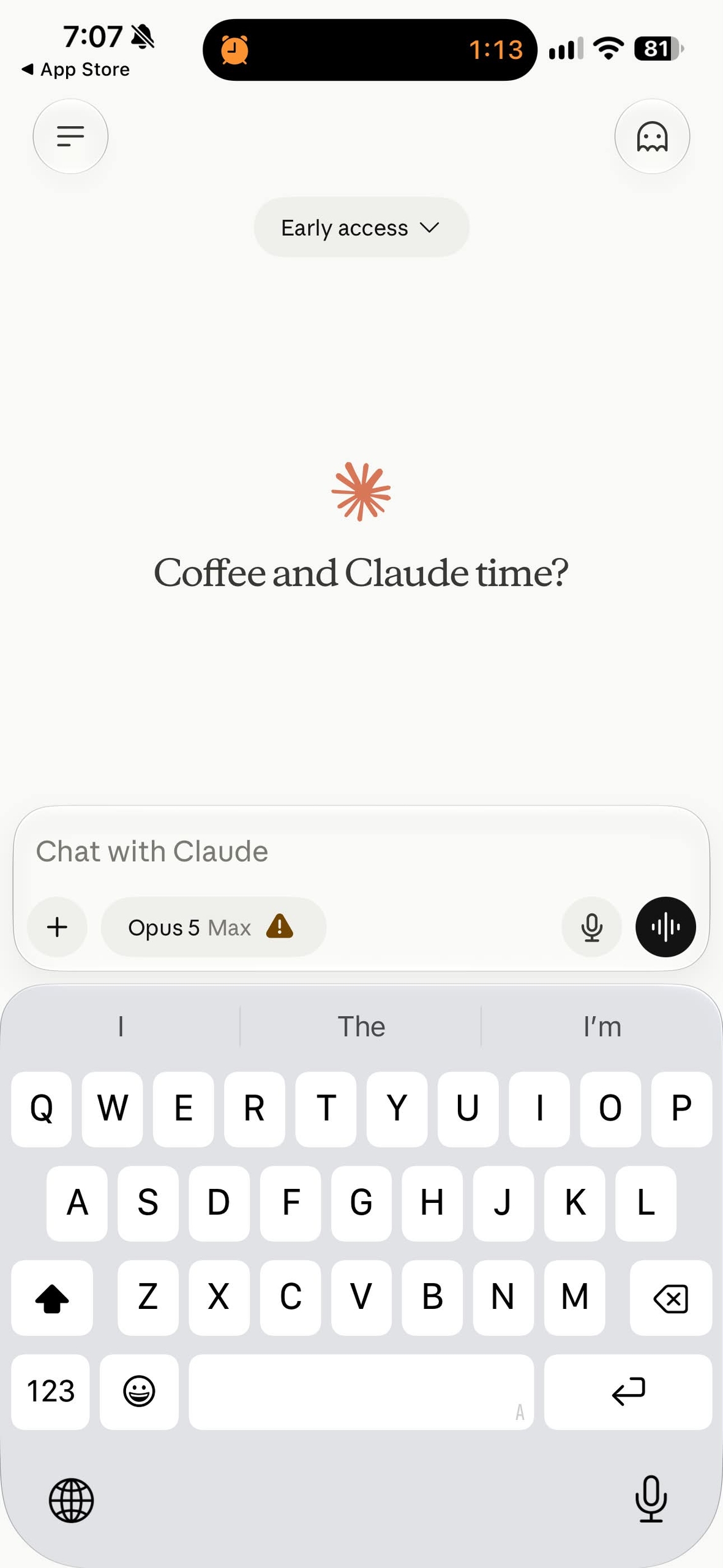
Claude iOS shows a Max effort usage warning
Max effort in the reported Claude iOS interface carries a “1.5 more usage” warning beside the setting. Anthropic’s documentation says higher effort uses more tokens and reaches usage limits faster.
Related stories
- Show HN: Generate a Claude Code or Codex agent fleet from one HTML file
- Show HN: Agent-hop – a Rust TUI that hops a live Claude Code chat into Codex
- Rysh puts a Claude or Codex agent in every terminal pane
- A Claude Code mod that reverts its own failed ideas
- Claude Code shipped its own TypeScript in npm source maps
- pairmark races Claude Code against Codex in your repo
Comments
No comments yet. Be the first.
Join the conversation
Sign in to leave a comment. It appears after moderation.